How to Use Kindle Cloud Reader (Kindle for Web) on a PC or Mac
Kindle Cloud Reader, now also called Kindle for Web, lets you read the Kindle books in your Amazon library in a desktop browser. There is nothing to install, and your reading position syncs with your other Kindle devices.
Open the reader for your Amazon store
Your Kindle library belongs to the Amazon store where your account is registered, so use that store’s reader address.
| Store | Kindle Cloud Reader address |
|---|---|
| United States | read.amazon.com |
| United Kingdom | read.amazon.co.uk |
| Canada | read.amazon.ca |
| Australia | read.amazon.com.au |
| India | read.amazon.in |
If you moved countries and your books are missing, check which Amazon store your Kindle content is registered to in your Amazon account settings.
Read a Kindle book in Chrome, step by step
reader
Amazon
a book
adjust
Open the reader address in your browser
Use a desktop browser such as Chrome on Windows or Mac and go to the address for your store from the table above.
Sign in with your Amazon account
Use the same account you bought or borrowed the book with. Books only appear for the account that holds them.
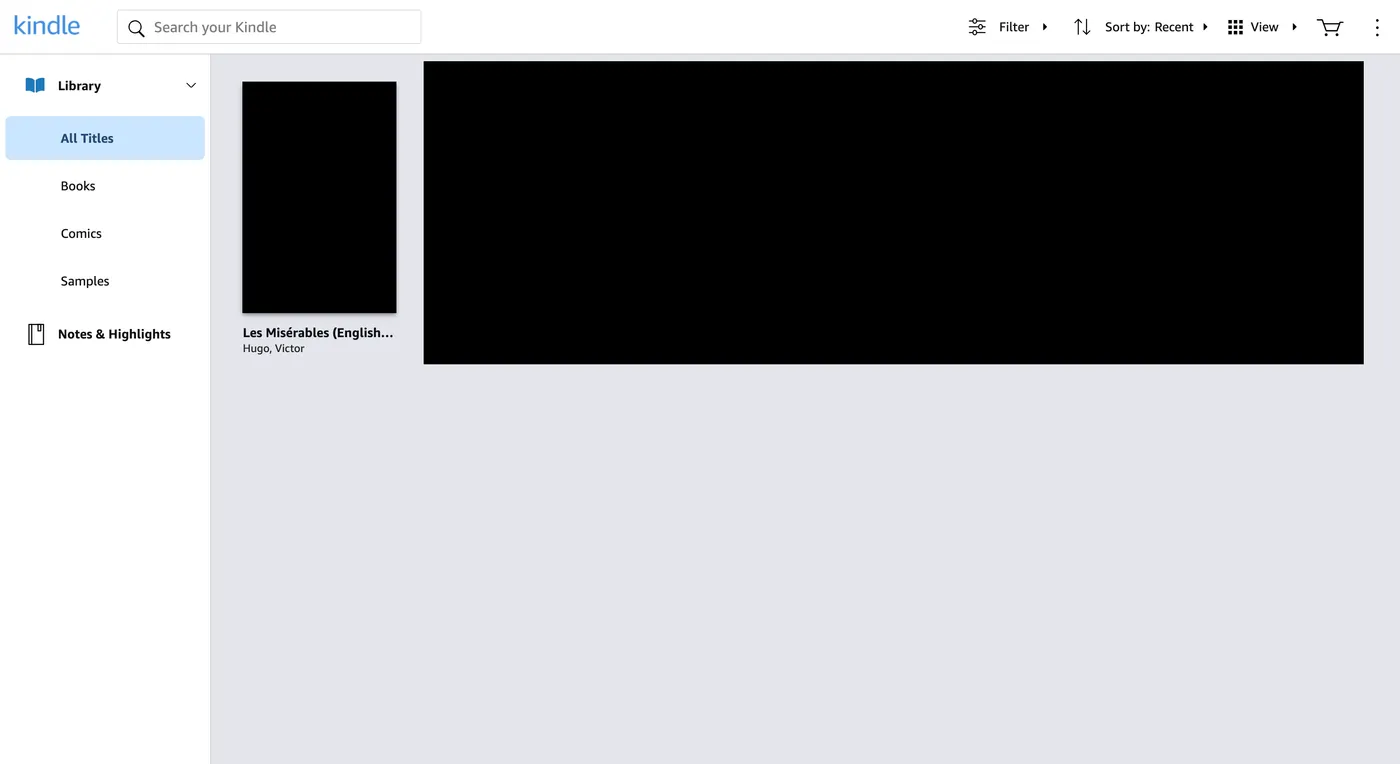
Choose a book from your library
The library lists All Titles, Books, Comics and Samples. Select a cover to open the book; if a details page appears first, use its read button.
Read and adjust the display
Turn pages with the arrow keys or by clicking the edges of the page. Use the reader menu to change the font, size and layout, or jump to a chapter. Your last page syncs to your other devices.
If a book will not open or is missing
- Wrong store: books bought on amazon.co.uk will not appear on read.amazon.com. Use the address for your store.
- Wrong account: check that you are signed in to the account that holds the book, including family-library members.
- Not every title is available on the web: some books open only in the Kindle apps or on Kindle devices. If a book is missing from the web library, try the app.
- Page will not load: reload the tab, turn off extensions that change page content, or sign out and back in.
For offline reading, the Kindle apps are a better choice than the browser.
Going further: make notes from what you read
Kindle Cloud Reader is also the place to start if you want to ask an AI about a book you own. BookHalo is a Chrome extension that works inside the reader: it turns the pages you are viewing into a TXT file and a reference PDF for your own notes. It does not work in the Kindle desktop or mobile apps, and it does not bypass any protection or Kindle warning.
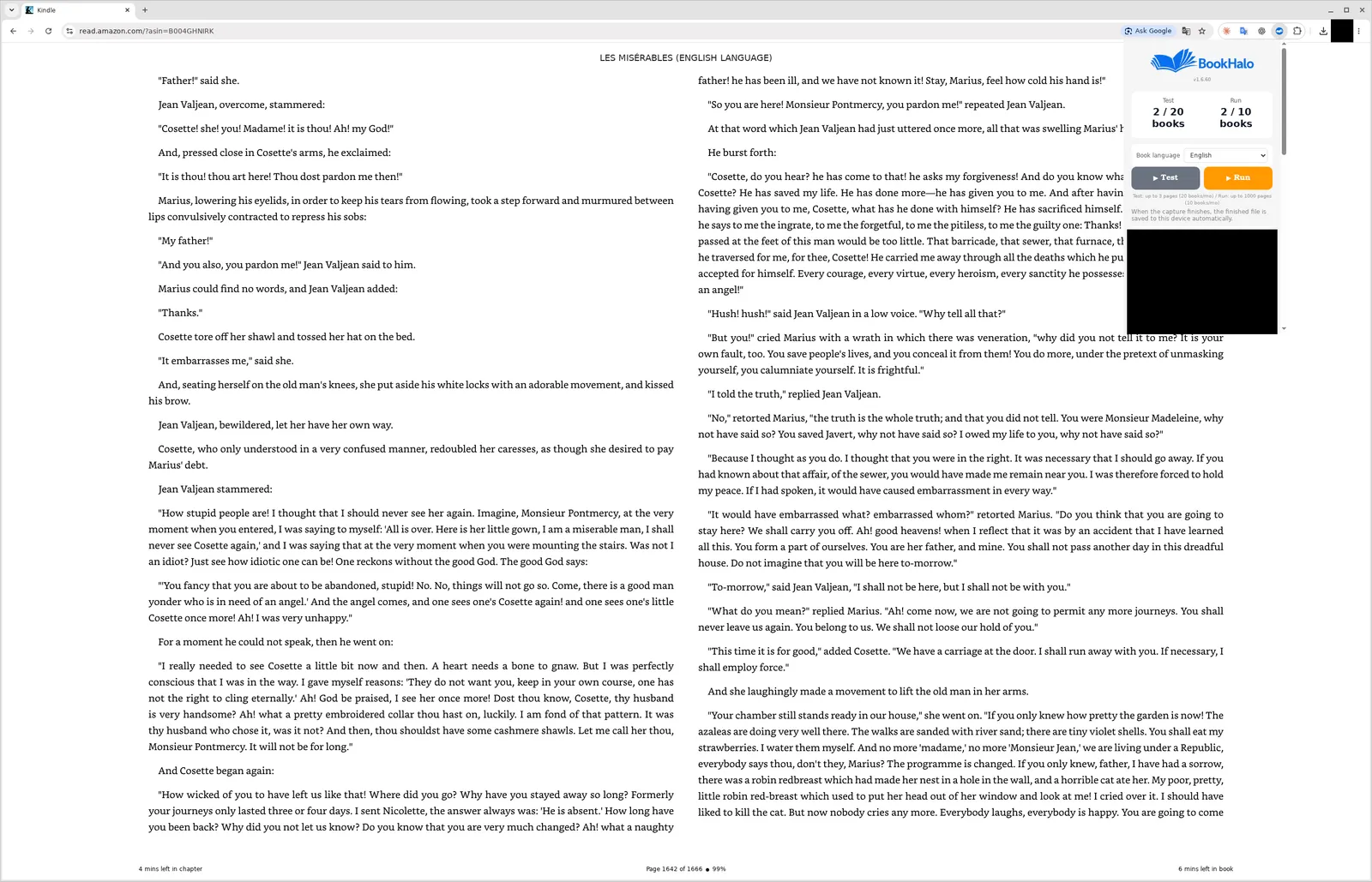
Try it on your book with the free three-page test, then compare the TXT with the PDF. How transcription from Kindle Cloud Reader works · How to use AI with Kindle books
Frequently asked questions
Is Kindle Cloud Reader free?
Yes. It is part of your Amazon account and you can read the Kindle books in your library at no extra charge.
Is Kindle Cloud Reader the same as Kindle for Web?
Yes. Amazon now calls the browser reader Kindle for Web, but many people still call it Kindle Cloud Reader. The addresses are the same.
Does Kindle Cloud Reader work on a Mac?
Yes. It runs in a desktop browser, so it works on Mac, Windows and Chromebook.
Where are my highlights in Kindle Cloud Reader?
Open Notes & Highlights from the library menu to see what you have highlighted in each book. How to export Kindle highlights and notes
Can I use BookHalo on read.amazon.co.uk or read.amazon.com.au?
Yes. BookHalo supports the US, UK, Canada, Australia and India reader addresses, among others. Availability can differ by account, so start with the free test.
Good to know
Kindle books are licensed for personal use under Amazon’s terms. If you use BookHalo, keep the files it creates to yourself: sharing, selling or publishing them is not allowed. Read any Kindle warning that appears and do not try to get around it.
Sources
Library screen captured with the English interface in September 2026. Amazon may change the reader’s layout and menus.
Turn the pages you read into notes
BookHalo runs inside Kindle Cloud Reader. Sign in and try three pages of your book for free.
Open BookHalo on Chrome Web StoreCapture is limited to personal or household use of books you purchased or otherwise have rights or permission to copy and retain. Kindle Unlimited, Prime Reading, loans and samples are excluded unless you separately have those rights or permission.
Agree using the checkbox in the popup; your agreement is saved in this browser. Purchase or confirmation alone does not authorize copying, prove ownership or guarantee legality. Read any Kindle warning and do not bypass restrictions.
Sending content to an external AI service is separate from copying it on your device. Check your rights to upload, store and share it, the destination terms, training and sharing settings, and conditions for using generated output. Buying a book does not necessarily permit uploading its full text.